Keel
Intelligent document management for your firm.
Every financial firm runs on documents. Engagement letters, tax returns, client correspondence, compliance records, internal memos. Thousands of files created, received, and referenced every year across every service line.
But most firms still manage them with tools built a generation ago. Documents get stored, but not structured. Filed, but not findable. The document management system becomes a filing cabinet nobody trusts, and people fall back on email folders, local drives, and memory.
Dock is Keel's document management solution, built on SharePoint and woven into the Microsoft tools your firm already uses. Documents are classified, governed, and searchable from the moment they arrive. Your team works with documents in SharePoint, Outlook, and Teams without switching to a separate application or learning a new system.
The Problem
Every engagement generates its own trail of correspondence, deliverables, source documents, and compliance records. Managing that volume is one of the firm's most important operational disciplines, and one of the most neglected.
Most firms still rely on legacy document management systems that were designed before cloud, before AI, and before the expectation that documents should be searchable, governed, and accessible from anywhere. The result is predictable: documents end up in the system but nobody can find them. Metadata is inconsistent or missing. Filing depends on individuals remembering the right folder and the right naming convention. When someone leaves, their filing knowledge leaves with them.
The firm has a document management system. It just doesn't manage documents.
When Firms Need Dock
Documents are in the system somewhere, but search doesn't work because metadata is missing or inconsistent. People resort to asking colleagues, scrolling through folders, or recreating what they can't find. Dock structures documents with real metadata from the moment they're saved, so search actually returns what the firm needs.
Every person has their own approach to naming files, choosing folders, and tagging documents. The result is a system that only makes sense to the person who filed it. Dock enforces consistent metadata at the point of filing and uses AI to classify documents automatically, so the system works regardless of who saved the file.
The firm knows the current document management system is outdated, but migration feels impossible because years of documents would need to be moved, reclassified, and restructured. Dock is built on SharePoint, and Manifest handles the migration. The firm gets a modern document management system and a clean migration path in one engagement.
Regulatory requirements demand that certain documents are retained for specific periods, protected from deletion, and auditable. The current system either doesn't support retention policies or makes them so complex that nobody configures them properly. Dock applies retention and governance rules automatically, tied to document type, service line, and engagement.
The firm's document management system is a separate application that people have to switch to, log into, and navigate. So they don't. Emails and attachments stay in inboxes. Client files never get filed. Dock meets people where they work. The Outlook add-in lets your team save, classify, and retrieve documents without leaving their email.
How Dock Works
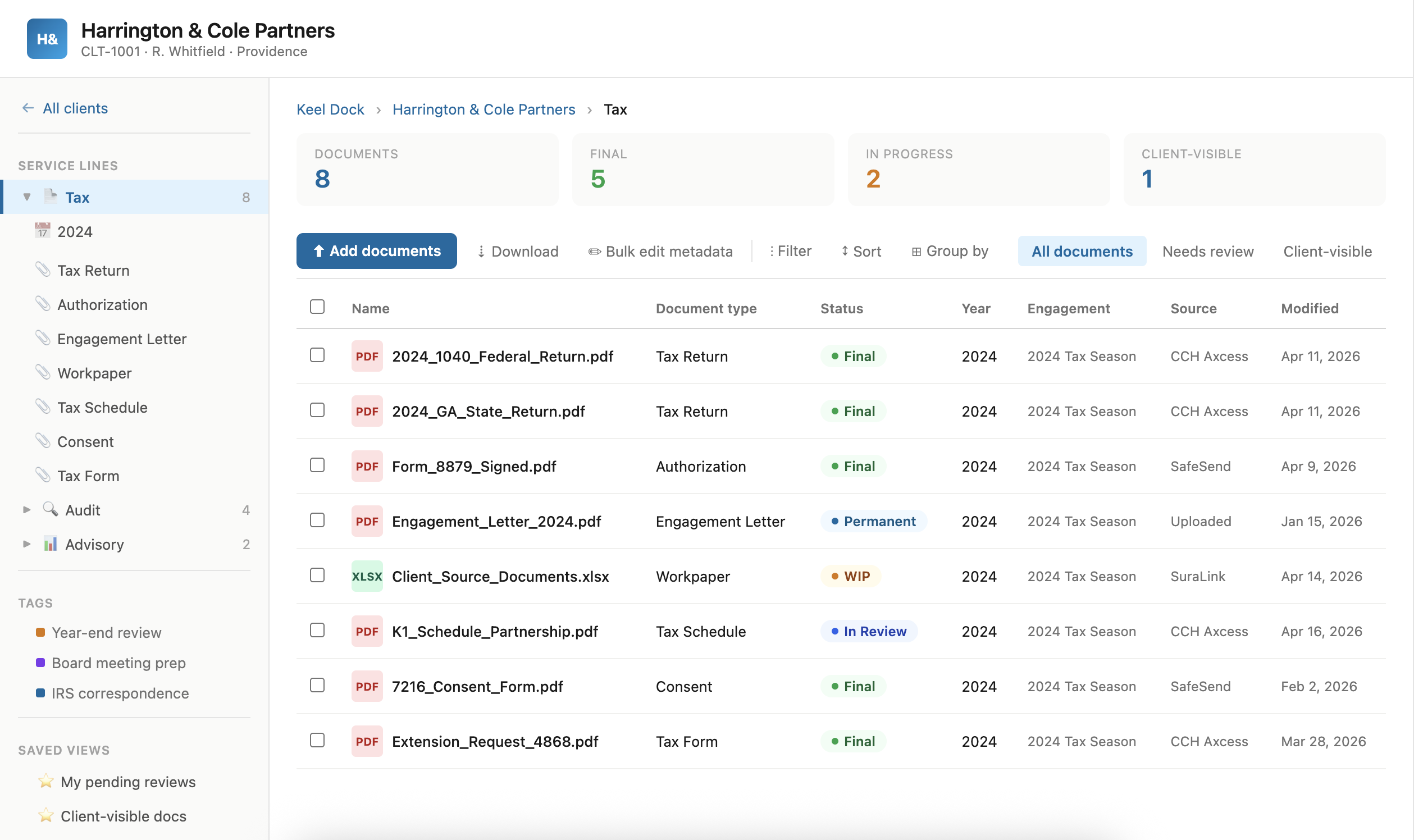
Dock structures your firm's documents around clients, service lines, and engagements, not folder hierarchies. Every document carries structured metadata: client, document type, service line, year, status. The structure is consistent across the firm because it's enforced by the system, not dependent on individual habits.
When documents arrive, Dock uses AI to identify what they are, tag them with the right metadata, and suggest where they belong. Engagement letters, tax returns, financial statements, correspondence. Classification happens automatically with confidence scoring, so your team confirms the result rather than doing the work from scratch.
Retention policies, compliance rules, and access controls are applied based on document type and context, not configured manually per folder. Documents follow the firm's governance rules from the moment they're filed. Status transitions (Draft, In Review, Final, Permanent) enforce the right controls at each stage.
Your team works with documents from the tools they already use. The SharePoint add-in provides structured navigation, search, and bulk operations. The Outlook add-in lets your team save emails and attachments directly into the right client library with AI-assisted classification. Search works across clients and service lines because the metadata is real.
What Makes Dock Different
Dock is not a separate application that syncs with SharePoint. It is SharePoint, enhanced with the structure, intelligence, and governance that financial firms need. Your documents live in your tenant, managed by your IT, governed by your policies.
Documents are classified and tagged automatically using the same document intelligence capabilities that power Manifest. The AI understands the language of financial services: engagement letters, tax forms, compliance records, client correspondence. Classification improves over time as the system processes more of your firm's documents.
SharePoint for structured document management. Outlook for filing emails and attachments without context-switching. Teams for engagement-level collaboration. Dock doesn't ask your team to change how they work. It makes the way they already work produce better results.
Dock organizes documents by structured metadata, not nested folder hierarchies. The same document can appear in a client view, a service line view, and a compliance view simultaneously. Views replace folders. Search replaces scrolling.
Retention policies, access controls, and compliance rules are applied based on document type and context. Your firm doesn't configure governance per folder or per document. The rules follow the metadata, and the metadata follows the document.