Keel
The system of action for your firm's digital work.
Your firm depends on automated workflows to move work through practice management systems, document platforms, and client portals. But most automation is opaque. Work goes in, results come out, and when something breaks, nobody knows why without calling support.
Deck changes that. It orchestrates automated work across the systems your firm already uses and surfaces everything in your own Microsoft environment. You see every job, every step, every outcome.
The Problem
A job gets submitted. Something happens behind the scenes. Eventually a result appears, or it doesn't. When it fails, the firm's only option is to file a ticket and wait. There's no way to see what happened, no way to understand why, and no way to take action without depending on someone else.
The problem isn't the automation itself. It's that the firm has no visibility into the work being done on its behalf. And without visibility, there's no control.
When Firms Need Deck
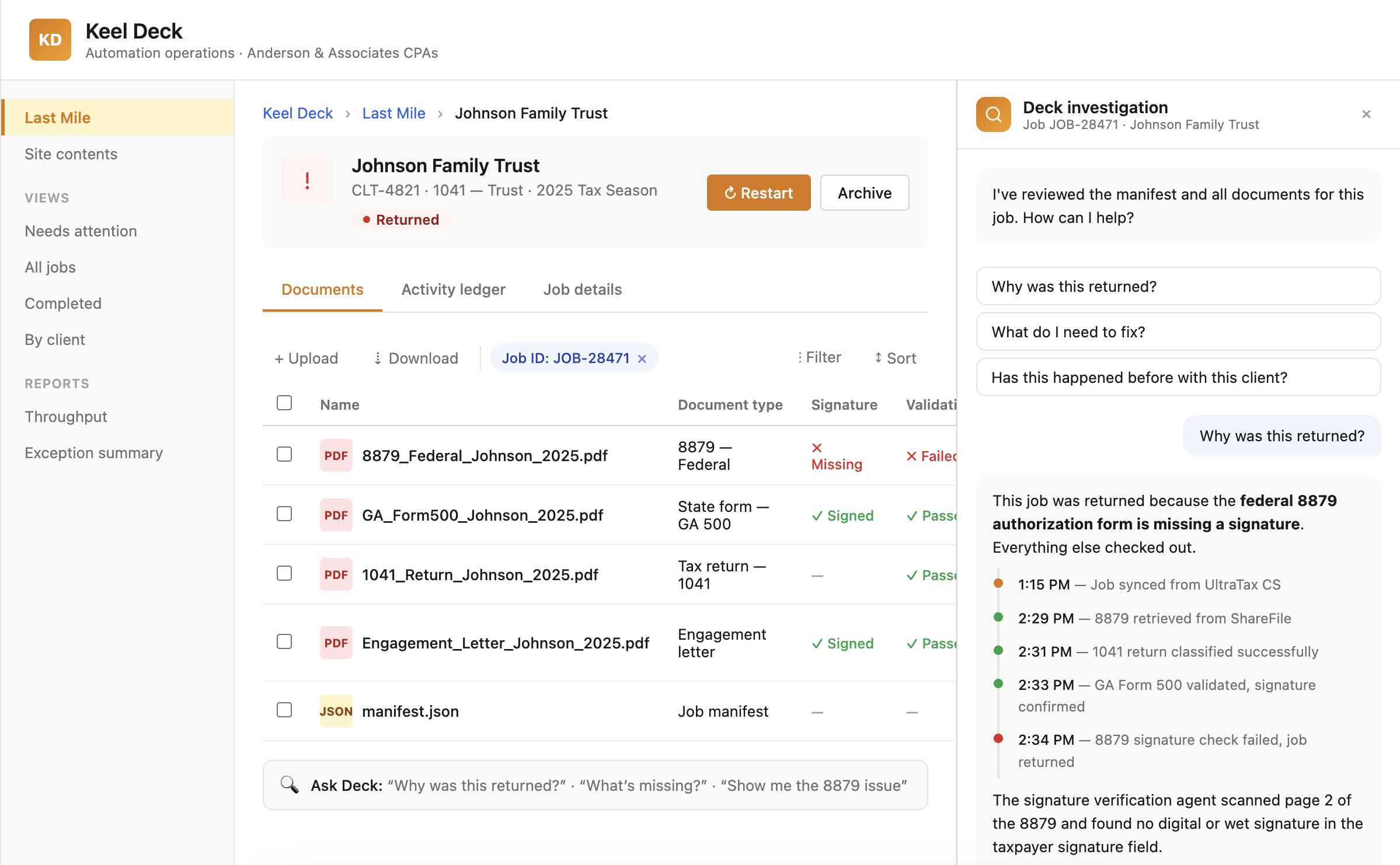
Jobs are running through automation platforms, but the firm can't see status, progress, or results without logging into a separate system or asking the vendor. Deck surfaces every job and its full history directly in the firm's SharePoint environment.
A job gets rejected or a document doesn't process, and the firm's only recourse is support. Deck gives the firm the tools to investigate what happened, understand why, and take action, whether that's restarting a job, flagging an issue, or resolving it themselves.
Practice management, workflow platforms, document systems, client portals. Each one operates independently. Deck connects to all of them through a unified connector layer, so the firm sees one view of the work, not five.
Compliance and quality require knowing what happened, when, and why. Deck's manifest captures every step of every job automatically. The audit trail isn't a report you generate after the fact. It's built into how the work runs.
How Deck Works
Deck connects to the systems your firm already uses through a unified connector layer. Practice management, workflow platforms, document systems, client portals. Each connector handles authentication, data retrieval, error handling, and retries so the automation runs cleanly across every system.
Jobs run through a declarative plan where each step is defined, executed, and recorded. If step 7 of 10 fails, you fix the condition and resume from step 7. You don't lose steps 1 through 6.
Automation is resumable, not restartable.
Every job, its status, its documents, and its full manifest are surfaced in your firm's own SharePoint tenant. No separate application to log into. No vendor portal to navigate. The work lives where your team already works.
Your team can investigate, restart, review, and resolve directly. AI-assisted investigation lets your team ask questions about any job and get real answers drawn from the manifest, product knowledge, and support history. When something needs attention, your team gets an explanation, not a ticket number.
What Makes Deck Different
Job documents and metadata live in your firm's SharePoint tenant. Keel orchestrates the work but doesn't hold your sensitive data.
Every step of every job is recorded: what happened, when, and why. This is the observability layer, the investigation tool, and the audit trail in one.
Document processing, job investigation, and self-service are all built with AI from the start. AI is how Deck thinks, not a feature bolted on after the fact.
The platform is designed to support multiple types of automated professional services work as your firm's needs evolve.